Mac Appreciation Group of Island County
Newsletter
September 2026
In This Issue:
- MAGIC MUG News
- Software Updates
- News, Information and Stories (Mac OS)
- iPhones, iPods, iPads, AirPods
- Apple Watch, Apple TV, HomePod, AirTag, AR Headset, Vision Pro
- Humor
- Malware and Mischief
- Sell or Swap
- By The Way
* Indicates author is a member of MAGIC

Meeting information
| Date |
16 September 2026 |
| Time |
4:00 - 5:00 p.m. |
| Presentation: |
• Introduction with Mike Turnbull
• "VPN (Virtual Private Network)" with Robert Elphick |
| Location: |
by Zoom online |
MAGIC Minutes for 19 August, 2026
by Wendy Shimada, MAGIC Secretary
At 4:02 p.m. President Mike Turnbull welcomed everyone and called the meeting to order with 15 attendees present within a few minutes. After last month's meeting challenges, brought on by some Zoom interface changes, Mike, Ron and Robert spent considerable time determining the best way to minimize confusion and issues and that time seemed well spent, with no complaints this month from attendees. Mike and Ron reiterated that you do not have to use the Zoom app to "attend" the meetings online; your browser works fine, actually even better, as there are no passwords to worry about and also you will not be inundated by advertisements, as in the case of using the Zoom Workplace App.
Treasurer Carol Heimgartner presented the monthly treasurer's report. With the only transactions being the $30 monthly Whidbey Telecom website hosting fees, our current balance is $4,054.60. The meeting was turned over at 4:08 to Ron Sharp, who gave an interesting presentation on Apple Notes, focusing primarily on Notes on the iPhone but also including using tips for using Notes on Macs. After a few questions, the meeting was turned back to Mike, who adjourned the meeting at 5 p.m.
Next month's MAGIC Zoom meeting will be September 16 at 4 p.m. Robert Elphick will be presenting VPN (Virtual Private Network), followed by the usual Q&As from members.
Missed the meeting? You can still watch the video tutorial on Safari by either visiting the MAGIC website at: MAGIC zoom Presentations or by just clicking on the MAGIC logo at the top of the monthly newsletter; it is a direct link to the MAGIC website, which offers many excellent tips and tricks, along with instructional video sessions from past meetings.
MAGIC Musings
Greetings Magic Members,
Summer is dissolving into autumn quickly and my iPhone's AI keeps reminding me to experiment for once and try Pumpkin Spice in my coffee this fall. I'm resisting that as much as I resisted changing from paper calendars to Apple 's calendar app. Meaning, maybe sorta eventually I will.
But I digress, this month's Zoom session regards VPN security networks presented by Robert. This is a method of additional security some of us may need to be using. We're looking forward to seeing you there!
And finally, the October meeting is scheduled for October 21st at 4:00 p.m.
Cheers,
Mike
MAGIC President
Note: This Software Update section of the newsletter lists the most relevant Apple updates. Not all updates are listed for all products. Additionally, I'll add other pertinent updates on occasion.
Software Updates, Operating Systems Overview
by Ron Sharp, MAGIC*
Mac OS 27 will be out soon, probably available by the end of September. In the meantime you should be on Mac OS Tahoe 26.6.2. On your iPhone and iPad you should on iOS 26.6.1.
If you're using an older Mac or iPhone, you may not be able to upgrade to the latest. Check your Settings, General , and then "Software updates" and see if you are up to date for your device.
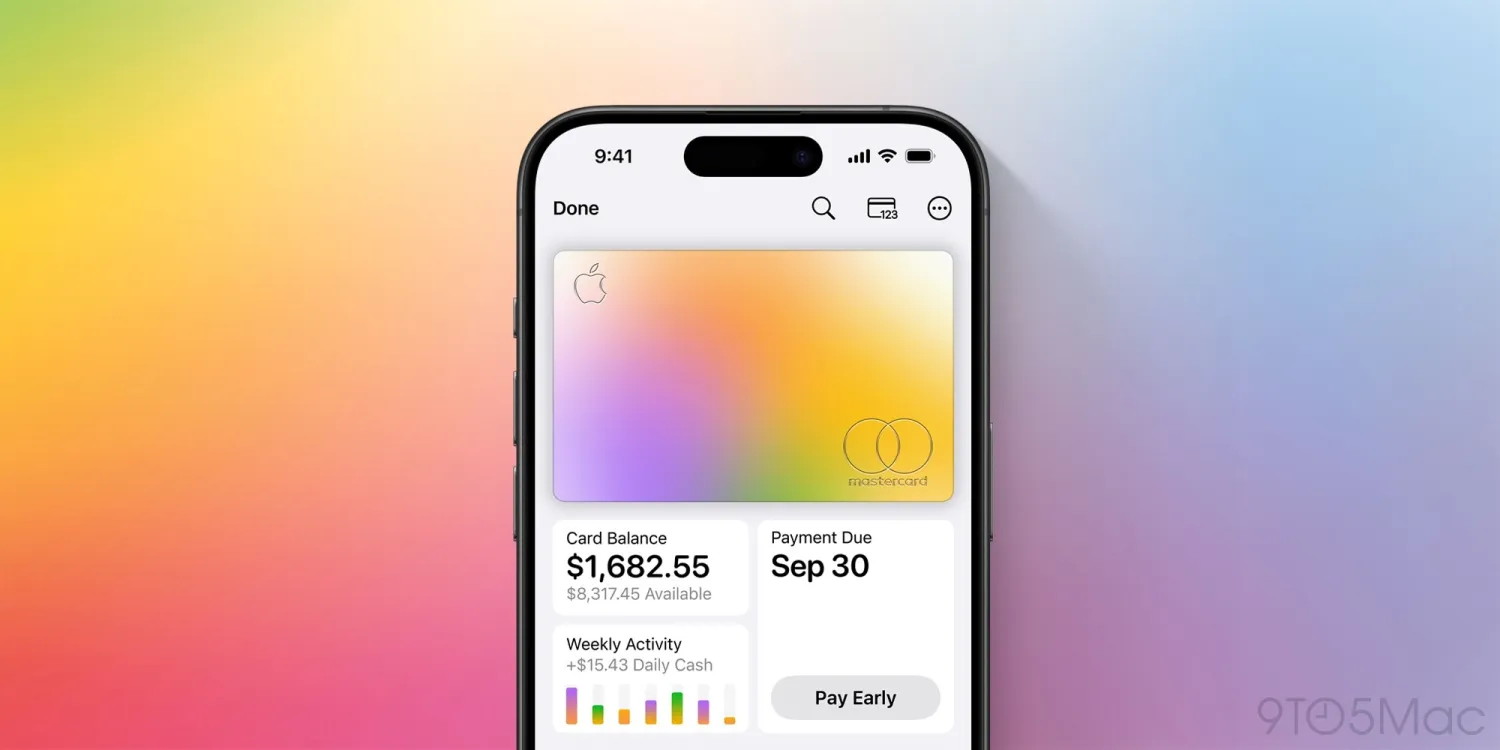
Apple Card keeps getting better, here's everything new
by Chance Miller, 9to5mac
Apple Card launched seven years ago this month, and it keeps getting better. There are new features, perks, rewards, and more. Plus, there's one major change looming.
Here's everything new with Apple Card lately.
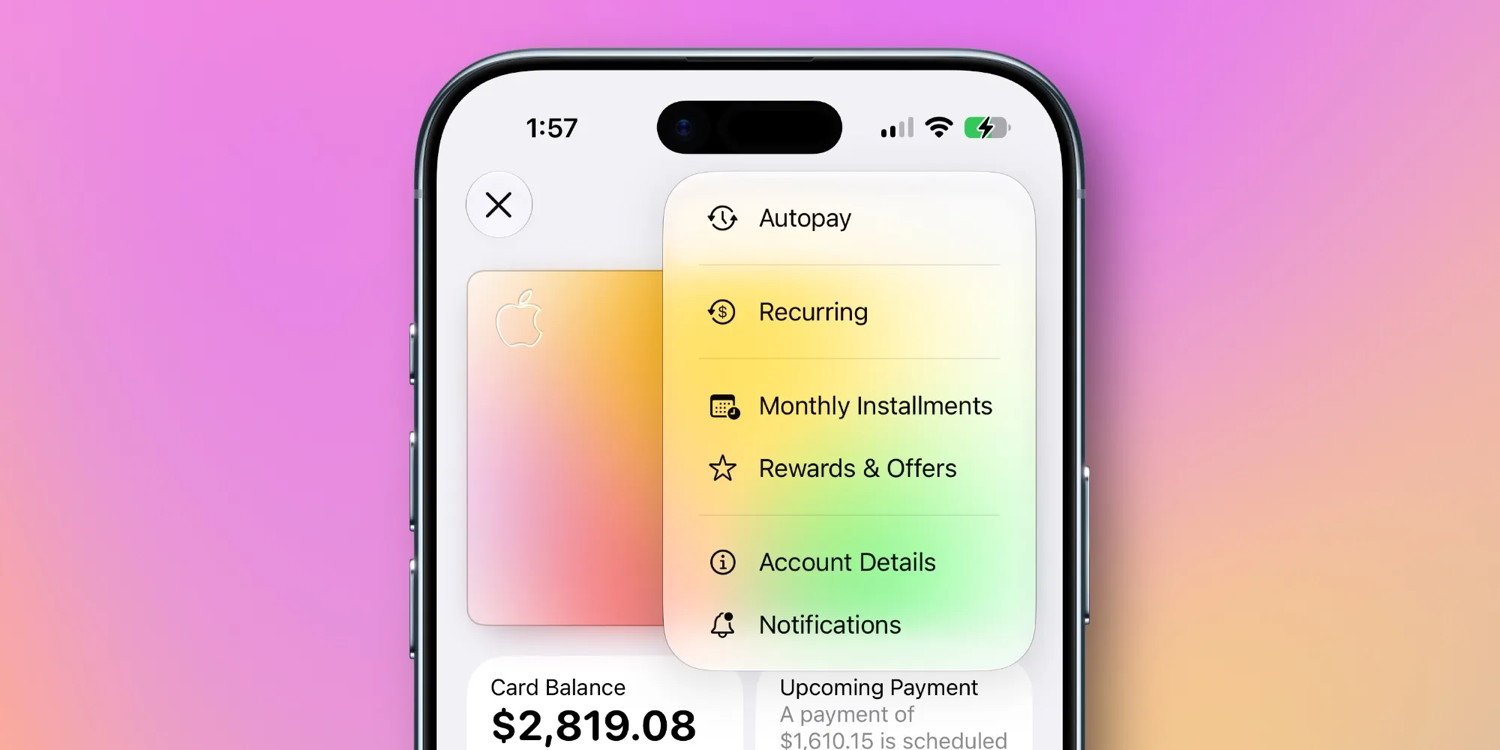
iOS 27: Recurring transactions
As my colleague Ryan highlighted last month, iOS 27 adds a really useful new "Recurring" feature to the Wallet app for Apple Card. You can find the "Recurring" hub by tapping the three-dot menu in the top-right corner.
In this menu, you'll see a list of upcoming recurring transactions that are set to be charged to your Apple Card. This includes the date and the amount of the expected transaction. In addition to viewing the transactions as a list, you can also see them on a monthly calendar view.
It's a helpful new feature for Apple Card users in iOS 27. The update is currently available to public beta testers and developers, and will likely be released to everyone next month.
New status perk
Earlier this month, Apple added a new perk for Apple Card users who travel a lot.
Apple has teamed up with Booking.com to offer all Apple Card users "Genius Level 2" status after one stay or car rental. You also get 3% Daily Cash on all Booking.com transactions.
What do you get with "Genius Level 2" status? Apple says your status could "unlock benefits on select stays and car rentals such as 10-15% discounts, free breakfast and room upgrades."
Hertz partnership
Last year, Apple announced a partnership with Hertz to provide exclusive perks when you book a caar rental with your Apple Card:
- Free Emergency Roadside Service
- Add loss damage waiver vehicle protection for the discounted rate of $16.95 per day (plus tax).
- Add a free additional driver at pickup.
- Save at least 5% off Pay Later base rates.
Additionally, Apple Card offers 3% Daily Cash for car rentals booked through Hertz.
Apple Card Savings Account expansion
One criticism people have of Apple Card is that it relies on your iPhone for key account management features. Since the Apple Card launch, Apple has worked to improve that.
Most recently, Apple launched web access for Apple Card Savings. This means you can now view and manage your Apple Card Savings Account directly in your web browser.
A big change looms
The big change hanging over Apple Card right now, however, is its impending move from Goldman Sachs to Chase. Apple announced the deal back in January and said the transition will occur "in approximately 24 months."
Many questions remain about what Apple Card's future looks like under Chase. Apple has promised that several key things about Apple Card won't change under Chase's leadership. We should learn more concrete details over the next 18 months as Chase, Goldman Sachs, and Apple iron out the details behind the scenes.
Wrap up
A
re you an Apple Card cardholder? What do you think about it? Personally, I think it's an excellent option for people in the Apple ecosystem, even if you can usually find better rewards through other ecosystems. I use my Apple Card to pay for my Apple subscriptions to get 3% Daily Cash back. The option to finance Apple hardware purchases with 0% interest is also very compelling.
Click for article.
Apple will launch 15+ new products this fall, here's what's coming
by Ryan Christoffel, 9to5mac
Apple has a packed lineup of products launching this fall, including new iPhones, Macs, iPads, and more. Here's every new Apple product rumored to arrive starting September 9.
iPhones: New iPhone 18 Pro and Pro Max, plus iPhone Ultra
Apple's flagship iPhone 18 lineup will go ultra-premium this fall, dropping the base model iPhone 18 that's rumored to arrive in early 2027 instead.
- iPhone 18 Pro: Big camera upgrades, unique new color, smaller Dynamic Island, more
- iPhone 18 Pro Max: Larger battery than ever, possibly exclusive camera feature
- iPhone Ultra: Apple's first ever foldable iPhone
Wearables: AirPods 5, Apple Watch Ultra 4, Apple Watch Series 12
Apple is rumored to launch three new wearables at its September event: AirPods 5 plus updates to the two flagship Apple Watch models.
- AirPods 5: Updated model with base and ANC variants
- Apple Watch Ultra 4: New health sensors, design updates, and more
- Apple Watch Series 12: Upgraded S-class chip, new health features
Macs: MacBook Ultra, new M6 MacBook Pro, and more
Apple has already launched a lot of new Macs this year, but three more models are reportedly coming—likely debuting in October.
- MacBook Ultra: New high-end model with OLED display, touch support, and more
- M6 MacBook Pro: Refresh for the entry-level MacBook Pro with M6
- M6 iMac: Newly refreshed color options
iPads: OLED iPad mini and possibly base iPad
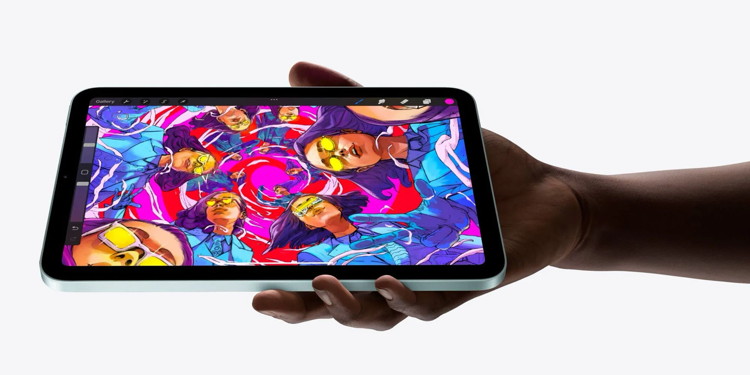 The new iPad mini is available today
Apple promo image with the Procreate app
A new iPad Air arrived earlier this year, but two more iPads could launch before 2026 ends: an iPad mini with OLED and a new base-model iPad.
- New iPad mini: OLED display and upgraded chip
- Base iPad: A18 chip for Apple Intelligence support
Apple Home products: Apple TV 4K, HomePad, more
Apple has big plans to expand its Home product line, but it's reportedly been waiting on Siri AI to arrive first. Here's the lineup of new products in the pipeline.
- New Apple TV 4K: Upgraded A-class chip, Apple Intelligence, new Siri Remote
- HomePad / HomePod Touch: New home hub with 7-inch touch screen, magnetic bases
- HomePod 3: Upgraded full-size HomePod with new chip for Apple Intelligence
- HomePod mini 2: New chip, audio improvements, and more
- Apple Security Camera: First-party smart home accessory with HomeKit Secure Video
Reportedly Apple has worked on a Face ID-equipped video doorbell product too, but it's been a long time since there's been an update on that.
Click for article.
Master AirDrop: Your ultimate guide to seamless file sharing on iPhone, iPad and Mac
by D Griffin Jones, cultofmac
 AirDrop is right up there with iMessage as a great Apple-exclusive feature. Learn how to use it.
Image: D. Griffin Jones/Cult of Mac
If you want to know the fastest and easiest way to send someone photos, videos, files and so, so much more, you should know how to AirDrop. There's no need to send an iMessage — Apple's slick AirDrop feature will immediately send and open the content on someone else's iPhone (or other Apple device). There's no middle step.
AirDrop works iPhone-to-iPhone, iPhone-to-Mac, iPhone-to-iPad, Vision Pro-to-Mac — any combination and permutation of two Apple devices. And, if your friend has a Google Pixel 10, you can AirDrop with them, too!
Keep reading to find out everything you need to know about how to take advantage of AirDrop.
How to AirDrop, the fastest way to share stuff from iPhone to iPhone
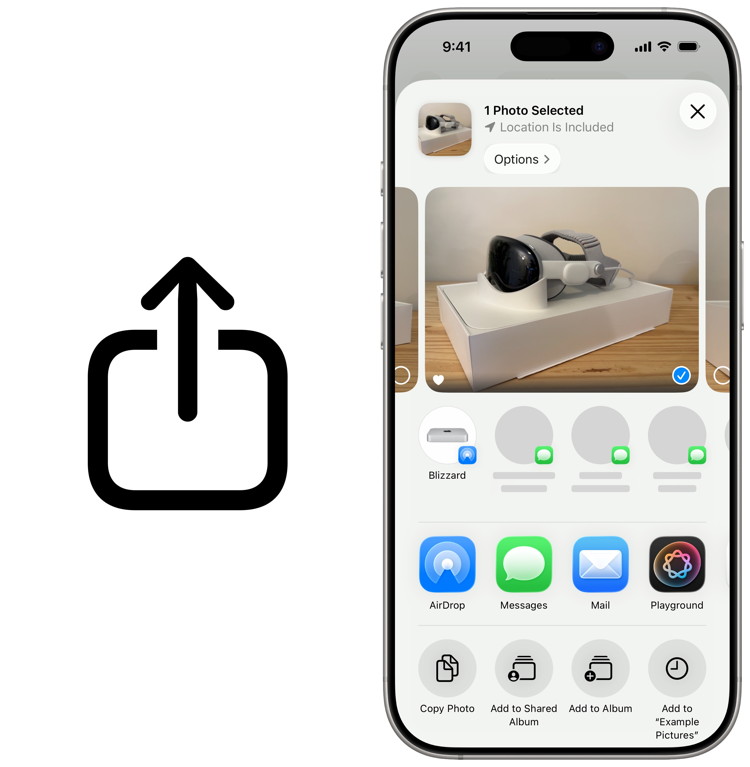 You can access AirDrop anywhere you see a share sheet.
The Share icon (left) and the share sheet (right).
Image: D. Griffin Jones/Cult of Mac
Just about anywhere you see the Share icon (left) or the share sheet (right) on your iPhone, you have something that can be sent using AirDrop. The most common use is sending pictures and videos, but there's so much more you can do. There's no limit on how much stuff you can send over AirDrop.
For instance, say you bring up a restaurant menu on your phone in Safari. You can easily AirDrop it to your iPhone-carrying friends so they can see it, too. If you're looking at a product on Amazon, looking to share a game on the App Store, or inviting someone to share a Note or Reminders list, AirDrop is the way to go.
AirDrop works using a system called Apple Wireless Direct Link. Even if you're not on Wi-Fi, both devices create a temporary peer-to-peer Wi-Fi connection to each other to carry the file transfer. The benefit is that while you may not have great service or a Wi-Fi 6e network, you'll still get the fastest possible speeds on AirDrop.
Continue reading for instructions....
iPhone 18 Pro: Three reasons you might want to upgrade from iPhone 17 Pro
by Ryan Christoffel, 9to5mac
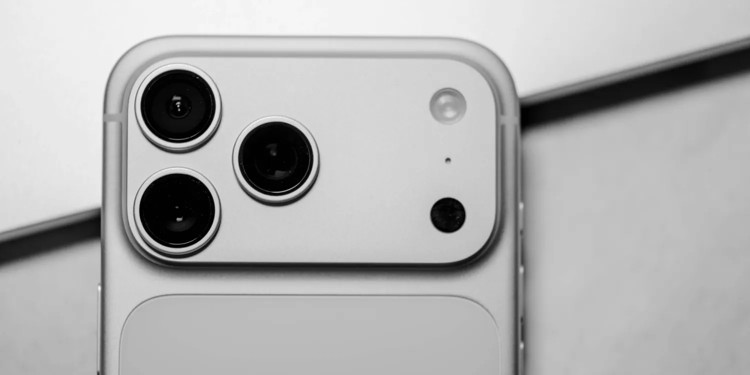 iPhone 17 Pro Silver
iPhone 18 Pro will be unveiled next week, and while most iPhone 17 Pro owners won't upgrade so soon, for those considering a new iPhone there are three main features likely to motivate them.
#1: Maxed out battery life
Better battery life is often at the top of iPhone users' feature wishlists. Who doesn't want an iPhone that lasts longer between charges?
Last year's iPhone 17 Pro and Pro Max brought big improvements in this area, but rumors indicate Apple will push battery life even further this year.
iPhone 18 Pro and Pro Max are expected to benefit from efficiency gains in multiple areas: an LTPO+ display, 2nm process for the A20 Pro chip, and possibly an Apple-designed C2 cellular modem.
Beyond these improvements, recent leaks point to larger physical batteries in this year's Pro models, especially iPhone 18 Pro Max.
#2: Big camera improvements
Mark Gurman says that iPhone 18 Pro will bring "the biggest leap in camera hardware" in years.
Rumors indicate the Main and Telephoto cameras will be Apple's primary focus, with a new variable aperture feature coming to the former and a larger aperture for the latter.
Weibo leaker Fixed Focus Digital also recently said that iPhone 18 Pro's camera plateau will be 2mm thicker than last year due to an "enlarged main camera module." This is another hint at big changes coming.
It would be nice to have more specific details at this point, but all signs point to Apple preparing some especially noteworthy camera upgrades.
#3: Revised design
For most people considering a year-over-year iPhone upgrade, design matters. If the new iPhone looks basically identical to your current model, the idea of upgrading is automatically less compelling.
While Apple isn't expected to overhaul iPhone 17 Pro's look and feel, it does reportedly have three design updates coming for iPhone 18 Pro:
- New color options
- Smaller Dynamic Island
- Unified rear glass and aluminum
Current rumors point to Dark Cherry, Light Blue, and Silver color options—possibly Black/Space Gray too.
iPhone 18 Pro's Dynamic Island is expected to shrink about 35% compared to the previous design, for a modern look and more useable screen space.
Finally, last year's polarizing two-tone rear color scheme should give way to a more uniform look on iPhone 18 Pro.
Click for article.
AirPods 5: Here's what rumors say will launch next week
by Ryan Christoffel, 9to5mac
Rumors indicate AirPods 5 are launching next week alongside iPhone 18 Pro, Apple Watch Ultra 4 and Series 12, and iPhone Ultra. Here's what we know so far about the new AirPods.
AirPods 5 expected to launch at September 9 event in two models, but no cameras
Apple's biggest event of the year is happening next week on September 9. Alongside new iPhones, Apple Watch models, and likely Home products, AirPods 5 are also expected to debut.
AirPods 4 launched in 2024, and historically Apple has had two- or three-year gaps between generations. AirPods launched in 2016, AirPods 2 in 2019, AirPods 3 in 2021, and AirPods 4 in 2024. So from a timing standpoint, a launch this year more or less fits the pattern.
What's surprising about the new AirPods, however, is how few rumors and leaks there have been about them.
Most AirPods rumors of late have centered on new models with cameras. A recent video leaked in Apple software showed the camera-equipped model in action, sparking speculation it would launch soon.
However, Mark Gurman at Bloomberg says AirPods with cameras will not arrive until 2027. But he's expecting AirPods 5—without cameras—to debut at Apple's September event. He recently wrote:
[Apple is] planning to debut fresh AirPods as early as the September product launch event. The rollout will include new AirPods 5, an update to Apple's entry-level earbuds, the people said. That model was last refreshed in 2024. A camera-equipped version of the AirPods, meanwhile, isn't expected until next year.
In a post on X, Gurman added that AirPods 5 will come in two distinct models:
- with Active Noise Cancellation
- without ANC
Previously in his reporting, Gurman wrote that he doesn't anticipate AirPods 5 getting the heart-rate sensor from AirPods Pro 3, but Apple "is looking to add several more health features to the AirPods over time, including a temperature reader." He also noted separately that Apple is "working on an H3 chip designed for less lag time and better audio quality."
It's unclear whether AirPods 5 will get the H3 chip or not. When Apple launched H2, it was exclusive to the AirPods Pro line initially.
But new health sensors are possible for AirPods 5, and H3 is a possibility too. Otherwise, details on AirPods 5 are minimal at this point. Perhaps like it did with AirPods Max 2 earlier this year, Apple will be able to surprise us with its AirPods 5 reveal.
Click for article.
Apple Photos in iOS 27 upgrades one of my favorite features in a big way
by Ryan Christoffel, 9to5mac
Apple Photos is full of exciting updates in iOS 27, including for one of my favorite features in the app: iCloud Shared Albums.
iOS 27 gives Shared Albums in Apple Photos several exciting upgrades
Apple's Photos app is one of my most-used apps, as I suspect it is for many iPhone users. It's where all of the photos and videos I capture live, plus screenshots, pictures shared by friends, and more.
But did you know that the Photos app also has a social media-style feature?
I'm not big on social media, but I do enjoy having a private, social-lite way to share memories with loved ones. And iCloud Shared Albums offers exactly that.
With iCloud Shared Albums, you can create an album that's shared with only the people you choose. Anyone invited can add their own photos and videos, and you'll get notified when they do. You can also 'like' shared photos and comment on them—just like a proper social network.
I've used and enjoyed Shared Albums for a long time, but the feature has felt in need of some upgrades. Fortunately, iOS 27 provides them.
In iOS 27, Shared Albums now support full-resolution photos and videos. That's a huge item checked off my wish list.
Additionally, iOS 27 expands how you can react to a photo or video. Now you can use any emoji of your choosing as a reaction—you're not limited to just 'likes.'
For the first time, Android and Windows users can contribute to the album via the web. Previously, they could only view content shared by Apple users.
Apple is also making it easier to save shared photos with a tap. And you can set new participant permissions and optionally have your album expire at a later date.
These upgrades address all of the complaints I've previously had about Shared Albums. Combined with the other improvements in iOS 27, it's a big year for Apple Photos.
Click for article.
Apple Pay is getting even better with four new features and more
by Chance Miller, 9to5mac
Apple Pay is a go-to feature for iPhone users when shopping in stores, online, and in apps. Apple recently announced four new features that make Apple Pay even better. Here's how they work, plus one major expansion that's rolling out now.
New design in iOS 27
One of my favorite changes in iOS 27 is the redesigned Apple Pay checkout interface. The new interface makes it much easier to switch between different cards during the checkout flow on websites and in apps.
In the new design, you can easily swipe between cards on the main Apple Pay checkout screen. You can also tap on a card to view a grid of all your available Apple Pay cards.
The design also makes it easier to see information about individual cards, including rewards, balances, pay later options, and more.
iOS 27 is available in beta to developers and public beta users. It will be released to everyone this fall.
American Express rewards
Apple and American Express recently announced a new partnership that lets you pay with American Express rewards points.
When shopping online or in apps with an American Express card, you'll see a new "Use Rewards" option alongside your available Membership Rewards points balance. You can apply points to cover all or part of your purchase, right in the Apple Pay checkout flow.
American Express points redeemed via Apple Pay are valued at 0.7 cents each. For example, this means 10,000 points can be redeemed for $70 applied towards your purchase.
Tap to Share
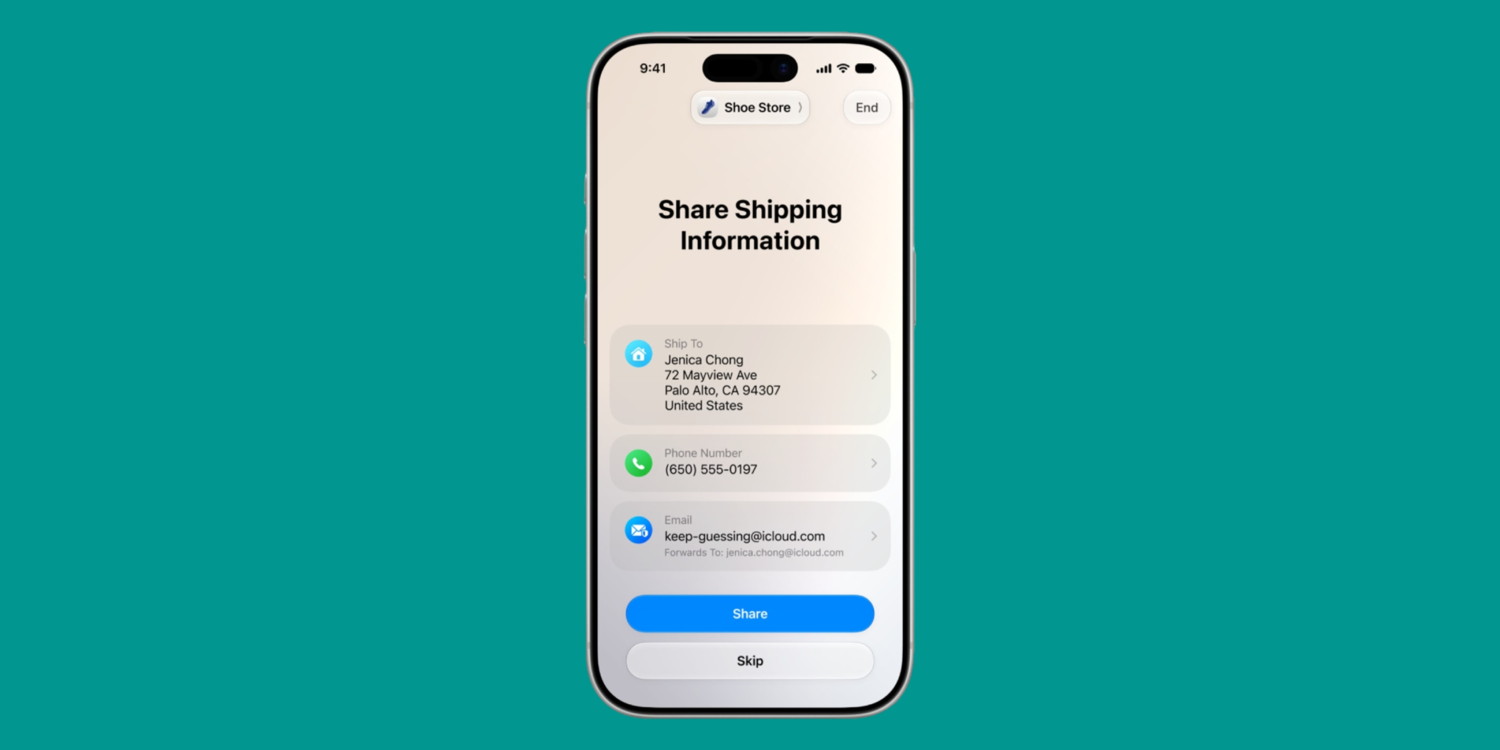
In iOS 27, Apple is adding a new "Tap to Share" feature that integrates with Apple Pay on iPhone for in-store shopping.
This feature, which Apple says will launch this fall, is an extension of Tap to Pay on iPhone. Apple explains:
With just a tap, customers can connect to a participating merchant's iPhone for a more personalized and faster in-store purchase experience that allows for secure sharing of information, such as email and other contact information, shipping address, loyalty rewards information, and more.
Customers will also be able to view the items in their basket in real time so they can keep track of what they've purchased and ensure all sales and discounts are properly applied.
When done, shoppers can complete the checkout on their iPhone using Apple Pay.
Reload debit cards
Later this year, iPhone users will be able to manage their debit card balances directly in the Apple Pay interface.
According to Apple, you'll be able to use Apple Pay to add money to a supported debit card directly in Apple Wallet or when checking out.
Bonus: Apple Pay at Walmart
This one isn't really a new feature developed by Apple. Instead, it's something that should've happened years ago finally coming to fruition. Walmart has announced that it is finally starting to roll out support for Apple Pay. Apple Pay is also rolling out to Sam's Club as part of this initiative.
Walmart started rolling out Apple Pay (and broader contactless support) this week in Arkansas. The retailer says it launch for all stores in the United States by the end of this year.
Wrap up
As Apple Pay continues to increase in popularity and prevalence among retailers, it's great to see Apple continue to improve the experience. Personally, Apple Pay is my checkout payment method of choice basically everywhere I shop — whether that's online or in store.
Click for article.
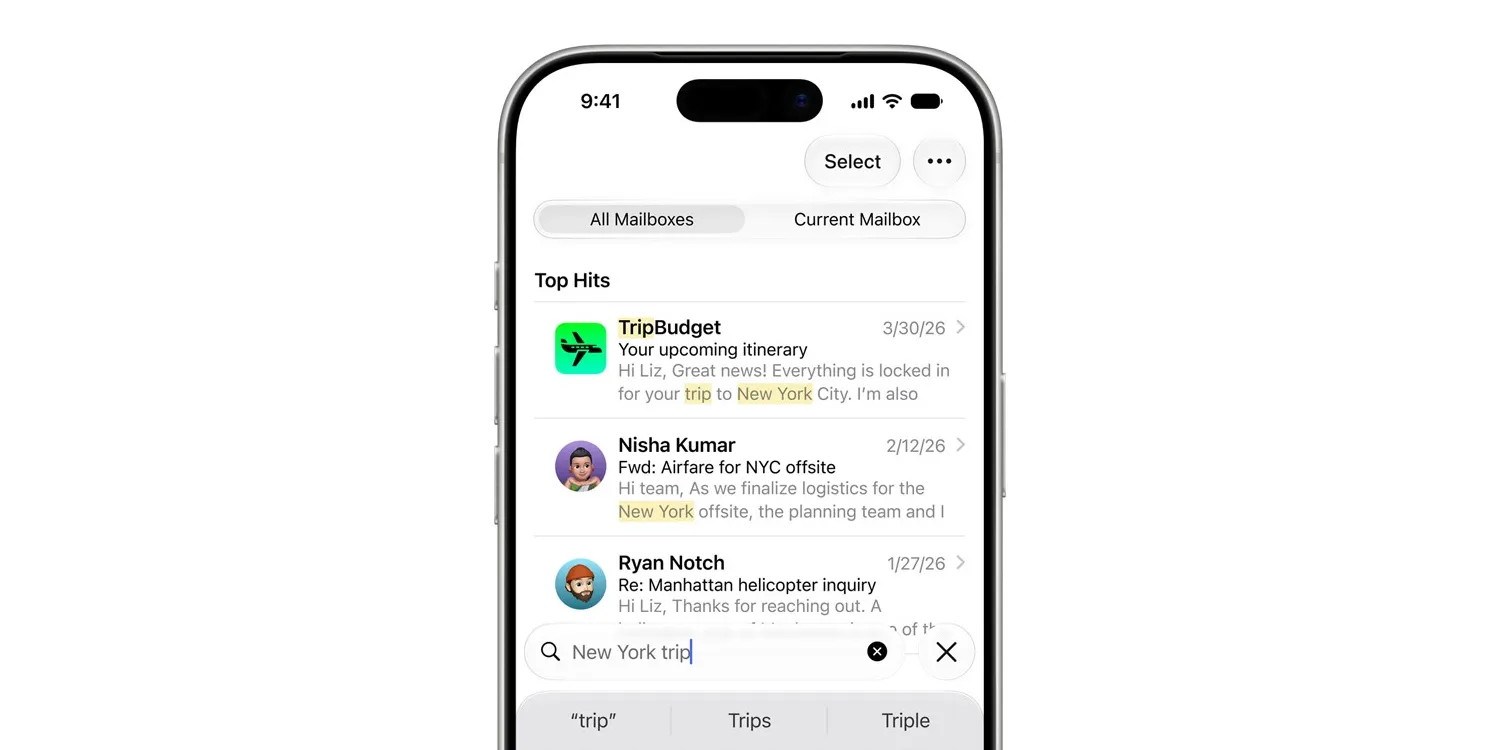
iOS 27 fixes Apple Mail in three ways longtime users will love
by Ryan Christoffel, 9to5mac
iOS 27 is packed with powerful features like Siri AI and upgrades to productivity apps like Apple Mail, Notes, Reminders, and Calendar. But for many users, some of iOS 27's best changes might be bug fixes that make apps run better than ever—here are three coming to Apple Mail.
Apple Mail in iOS 27 has improved badge accuracy, faster message loading, and more reliable search
There's no shortage of new features in iOS 27. But Apple also took extra time with this update to make everything run smoother and more reliably than before.
It's not often the company touts bug fixes as a feature, but that's exactly what happened when iOS 27 was announced.
Among iOS 27's quality-of-life improvements, there are three Apple Mail fixes that longtime users should appreciate:
- Improved unread badge accuracy
- Faster message loading
- More reliable search indexing
These three improvements were highlighted on a massive slide containing hundreds of big and small iOS 27 changes.
Unread badge accuracy has been a personal pet peeve of mine for years. I keep badges disabled for most apps, but of those precious few where they're enabled, Mail has been a top offender in showing a phantom badge or inaccurate number.
It's similarly frustrating when messages in the inbox take too long to open, but Apple has sped up message loading in iOS 27.
And while your mileage may vary, I've found iOS 27's search improvements in Mail a noticeable upgrade.
These bug fixes join the handful of new features for Apple Mail in iOS 27. So if you haven't used Mail in a while, iOS 27 could be a great time to revisit it.
Click for article.
Apple home hub sparks major Apple Store shake-up
by Anurag Chawake, cultofmac
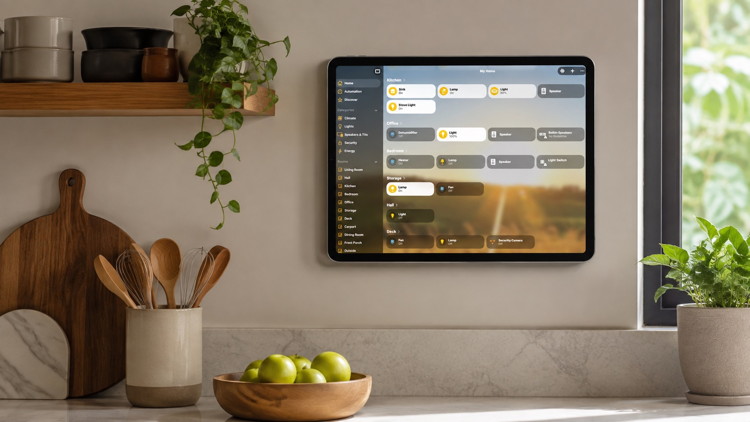 The Apple Home Hub could get its own dedicated display area in Apple Stores this fall.
Photo: Ed Hardy/ChatGPT/Cult of Mac
Apple is clearing shelf space for a new era of smart home gear. The company is reportedly preparing a significant overhaul of its retail stores this fall. The changes point to more than a routine refresh. And at the center of it all sits the rumored Apple home hub — its first smart display built for the home.
The retail work targets the "Avenues," the perimeter walls in Apple's newer stores. These walls showcase HomePod, Apple TV, AirPods, and Beats gear. Store-layout teams are reportedly rearranging these sections and adding new accessory bays. The scale of the project suggests Apple needs room for something significant.
Apple home hub could headline the fall lineup
Bloomberg's Mark Gurman reported the retail changes in his Power On newsletter on Sunday. He said store design teams are reworking the Avenues to make space for new devices arriving this fall.
Gurman added that Apple is planning an updated Apple TV set-top box and a refreshed HomePod mini. But he did note that the store changes go well beyond what those two updates alone would need. This is why he thinks the Apple home hub might finally make its retail debut.
Apple reportedly wants a dedicated area for the new hub where shoppers would be able to see how it works and fits into a broader smart home setup. That would be a shift from today's setup, where smart home gear sits alongside AirPods and Beats headphones on shared shelving.
What to expect from the new Apple home hub
The home hub has been rumored for years. Reports suggest it will ship in two versions: one with a built-in speaker on a dome-shaped base, and another one that mounts to a wall or plinth using magnets.
Both versions are said to sport a seven-inch square touchscreen. The screen would handle typical smart home duties, like adjusting lights, checking security cameras and doubling up as a digital picture frame when idle.
Rumors also point to intercom functionality and smart lock controls, while a front-facing camera would reportedly handle FaceTime calls.
The home hub reportedly will run on a new operating system built around tvOS. Siri AI would also be baked in throughout. Code found inside a recent macOS Tahoe beta also hints at a widget gallery for the home screen.
Gurman's earlier reporting places the home hub's launch window between October and early next year. But the retail activity suggests something else. Apple could potentially reveal the hub earlier, alongside the new Apple TV and HomePod mini.
HomePod mini and Apple TV updates are close, too
Given the leaks and rumors, the HomePod mini refresh sounds like an internal update, not a redesign. Reports point to a faster chip that supports Siri AI, while Wi-Fi 7 and Bluetooth 6 upgrades could also be on the way. The current HomePod mini hasn't been updated for years, so even a modest bump would be welcome.
The next Apple TV 4K is expected to get a similar treatment. Leaks hint at an A17 Pro chip or newer, which should be enough to run Siri AI locally. There's also talk of a new Siri Remote, but what exactly would change about it remains unclear.
Taken together, the store changes hint at one thing: Apple finally seems to be ready to modernize its home lineup. That comes after years of delays tied to Siri's long-delayed overhaul. Whether it means one big September announcement or a staggered rollout, new Home gear should start showing up on Apple's shelves soon.
Click for article.
Apple Watch Series 12: Everything we know so far
by Anurag Chawake, cultofmac
After years of small updates, Apple Watch Series 12 looks ready to kick things up a notch. Rumors point to a faster chip, a returning ceramic option and new AI-powered features.
The launch of the new smartwatch is mere weeks away. Here's everything reported so far.
Apple Watch Series 12 rumors: Small steps, not a redesign
Apple hasn't given the Apple Watch a real design overhaul since Series 10 slimmed things down in 2024. And while Series 12 will bring meaningful upgrades, they won't be to the design. Numerous reports agree that the Apple Watch Series 12 won't look much different from Series 11.
Instead, Apple appears to be focused on what's inside the case. A faster processor, refreshed materials and software improvements make up most of what's expected. None of this is confirmed yet, so treat every detail as a rumor.
A faster chip may finally be coming
Apple Watch Series 9, 10 and 11 all shipped with basically the same processor, despite the chips getting new names each year. That streak may finally end with the Series 12. Apple Watch Series 12 and Apple Watch Ultra 4 will finally get a long-overdue chip upgrade, likely called the S11, according to a leak from Bloomberg's Mark Gurman. If true, it would bring the first real performance jump for the lineup in years.
Continue reading article....
Here's how Apple Watch Ultra 4 will differentiate itself from prior models
by Ryan Christoffel, 9to5mac
Apple Watch Ultra 4 is coming on September 9, here are the key ways it's rumored to differentiate itself from prior models.
'Significant upgrade' to health sensors
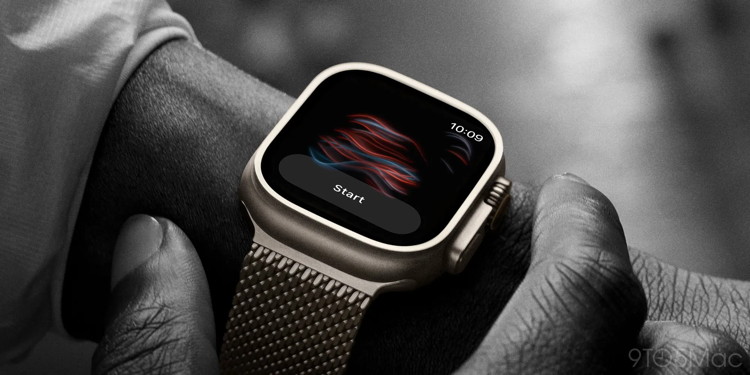 Apple Watch Ultra blood oxygen sensor
Digitimes has reported on multiple occasions that Apple Watch Ultra 4 will bring significant upgrades to internal sensors. It went as far as saying "the number of sensor components will double."
Mark Gurman reported this week that "upgrades to fitness tracking" are coming. And there's evidence that a new high blood pressure-related feature has been reviewed by the FDA for release soon.
Though many specific details around these sensor additions are still unknown, it sounds like Apple Watch Ultra 4 could lean more than ever into health and fitness tracking.
New S-class chip, the first built in AI era
Last year's Apple Watch models used the same S10 chip that first debuted in 2024. But the last time the Watch got a truly meaningful speed and performance bump was 2023.
Rumors indicate Apple Watch Ultra 4 and Series 12 will have a brand new, more powerful chip—likely dubbed S11 or S12.
The timing lines up perfectly with Siri AI's debut in watchOS 27. And no doubt, the first CPU boost in an S-class chip since 2023 will pack improvements that benefit AI features.
There's a lot of potential for Apple Watch to be the first mass-market AI wearable. I'm excited to see how the new chip might help move that needle.
Wildcard: Design updates
There are conflicting reports concerning Apple Watch Ultra 4's design. While Digitimes claims a redesign is coming, Bloomberg's Mark Gurman said last month: "None of this year's watches is expected to get a major design overhaul."
We do know that a ceramic case option is expected for Apple Watch Series 12. So it's possible that Apple will similarly offer something unique for Apple Watch Ultra 4's design. Reporting is unclear, but perhaps we'll see design updates that differentiate the latest Ultra model.
Click for article.
Apple announces price increase for Apple TV and Apple One subscriptions
by Chance Miller, 9to5mac
Just weeks after announcing price increases for Apple Music, Apple today announced that
Apple TV is also getting more expensive. The company confirmed to 9to5Mac that the price of Apple TV is increasing from $12.99 to $14.99 per month.
The Individual tier of Apple One is also getting more expensive.
Apple TV, Apple One get more expensive
Here are the full details on the price increases:
- Apple TV (monthly): $14.99 (up from $12.99)
- Apple TV (annual): $119 (up from $99)
- Apple One Individual: $21.95 (up from $19.95)
Prices for other Apple One plans are unchanged. When Apple increased the price of Apple Music last month, it also raised the Apple One Family and Apple One Premier plans, but not the Individual plan.
The higher prices go into effect today for new subscribers. Apple says existing subscribers will be notified of the price increase about a month before they are charged the new price.
Apple last increased the price of Apple TV in August 2025, raising it from $9.99 per month to $12.99 per month. The company did not raise the price of the annual plan or Apple One bundles at that time.
Apple has expanded Apple TV's lineup significantly over the last year. Last October, it announced a deal to become the exclusive Formula 1 broadcast partner in the US. F1 streaming is included in the normal Apple TV subscription price at no additional cost.
Earlier this year, Apple also added Major League Soccer streaming to Apple TV at no additional cost. Previously, MLS access was behind a separate MLS Season Pass paywall.
Apple is also riding high on the success of recent launches like season four of Ted Lasso. Just today, Apple TV debuted the second season of Dark Matter. Slow Horses season 6 premieres on September 16.
Click for article.
Apple Vision Pro was just used in a first-of-its-kind surgery
by Chance Miller, 9to5mac
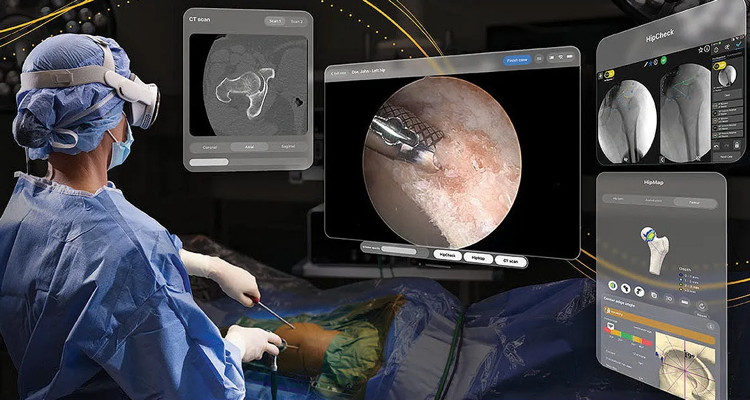
We've seen several stories about Apple Vision Pro being used in healthcare settings. This week, Stryker announced the completion of the first surgical procedure using an innovative new app on Vision Pro.
The surgery, a hip arthroscopy, was completed using SportSuite Vision, an app that brings "critical digital content into a surgeon's virtual space." This includes things like arthroscopic video, HipCheck, HipMap, and CT imaging.
Here's how Stryker describes the app:
SportSuite Vision brings critical digital content into a surgeon's visual space, allowing them to see physical objects in the OR alongside digital tools such as arthroscopic images, HipCheck, HipMap and CT imaging.
During arthroscopic procedures, surgeons often rely on multiple displays positioned throughout the OR to access visualization and procedural data. By bringing multiple data sources into the surgeon's field of view, the technology can reduce reliance on traditional monitors and support a more streamlined, ergonomic surgical workflow.
SportSuite Vision received FDA De Novo authorization on July 17. Stryker says this makes it the first app the FDA has authorized for intraoperative use with Vision Pro.
The hip arthroscopy was completed at Duke Health. Chad Mather III, the orthopedic surgeon who performed the operation, praised Vision Pro and SportSuite Vision:
"Using spatial computing enabled me to customize the placement of key clinical information to fit my workflow and access it within the sterile field. This helped create a more comfortable, streamlined OR setup while keeping the information I needed in view."
You can learn more about SportSuite Vision on the Stryker website.
Also this week, Pfizer announced it is using Apple Vision Pro "to create an unforgettable, immersive experience" to "illustrate" its commitment to "outdo cancer."
Pfizer's bold mission is clear: Outdo cancer through relentless innovation and hope. To vividly illustrate this commitment for patients, healthcare providers, and internal stakeholders, Pfizer collaborated with Groove Jones to craft an immersive mixed reality experience that inspires as much as it informs. Apple Vision Pro's ability to seamlessly blend digital and real worlds provided the perfect canvas to emotionally connect audiences and showcase Pfizer's oncology leadership.
You can get a closer look at the experience on the Groove Jones website.
Click for article.
by Penny Holland, MAGIC*

Malware Examples *
by Ron Sharp and Robert Elphick, MAGIC *
Here are some tips if you do respond to a scam email. Call your bank. Put a stop payment on your charge card if it is involved. Change your account password for whatever accounts are involved. If it's a PayPal account, log into that account and change the password. If you use a bank account online change that password. You can also set up email "rules" to block email from the sender if their email address shows. If you use Apples Mail app you'll find the "Rules" options in the Mail app Settings. You should also change the password to your email account that the scam email came to.
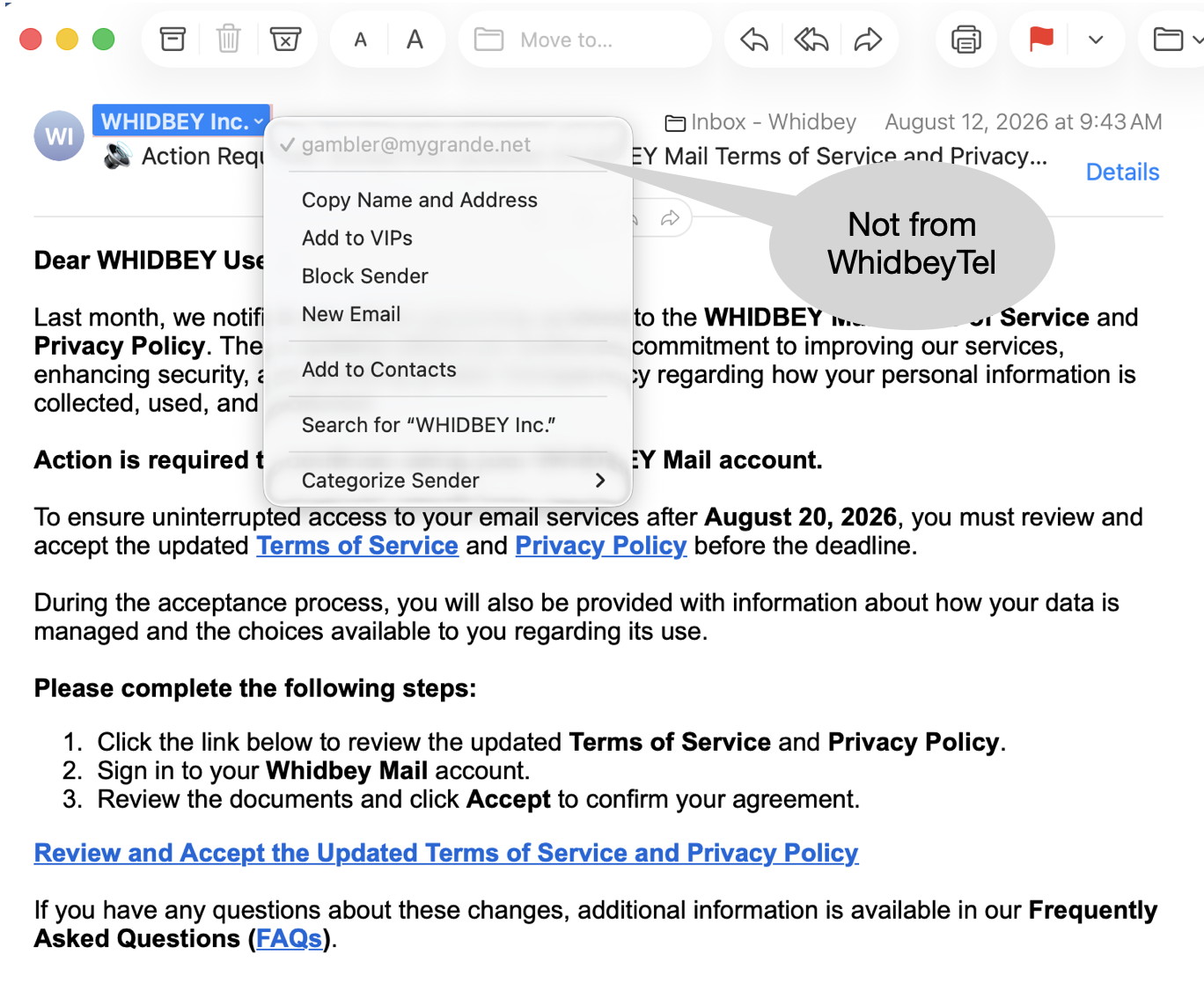 From address is not from WhidbeyTel (arrow)
DO NOT RESPOND.
 From address is not from supposed sender (arrow)
DO NOT RESPOND.
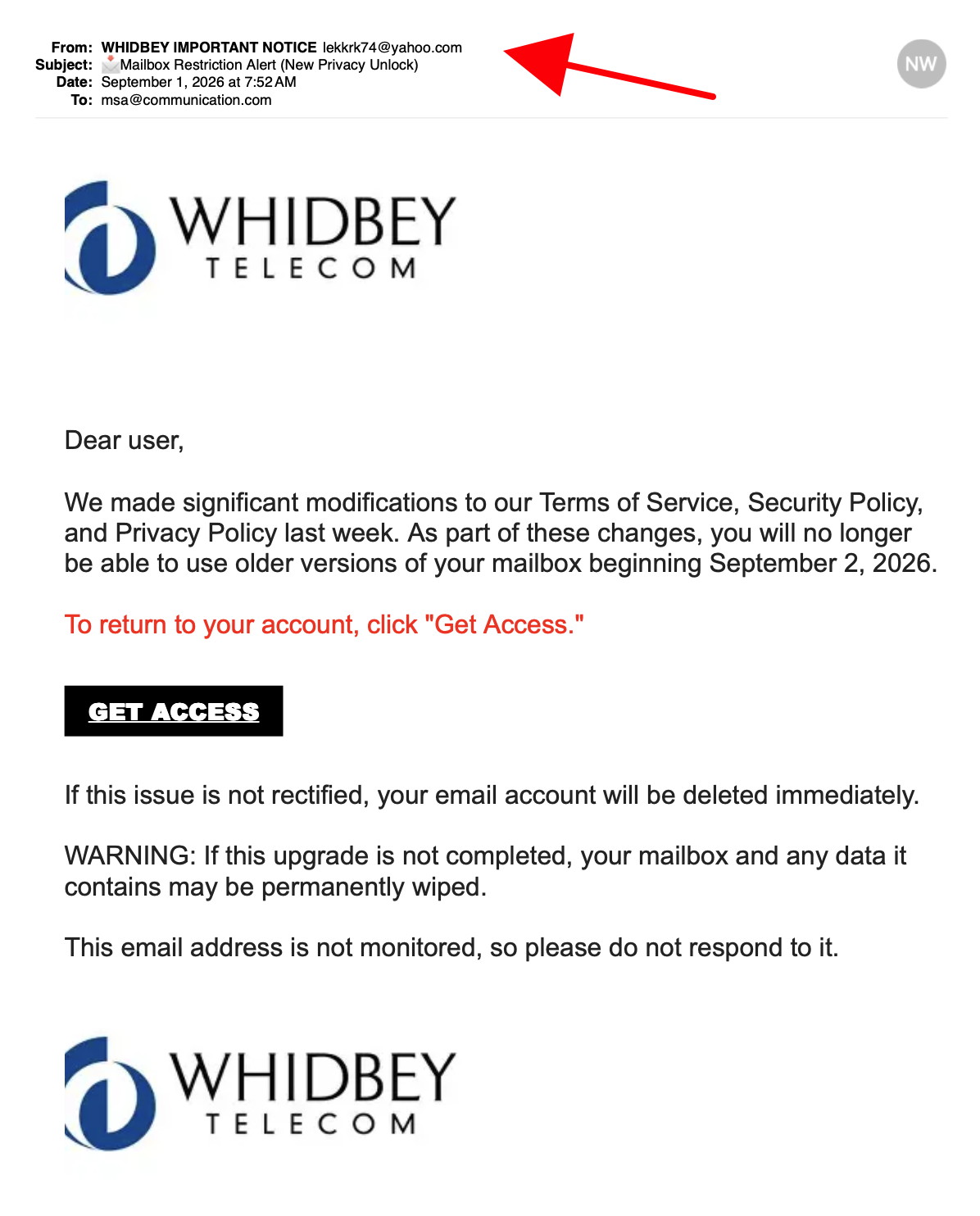 From address is not from WhidbeyTel (arrow)
DO NOT RESPOND.
 From address is not from GEEK SQUAD (arrow)
DO NOT RESPOND.
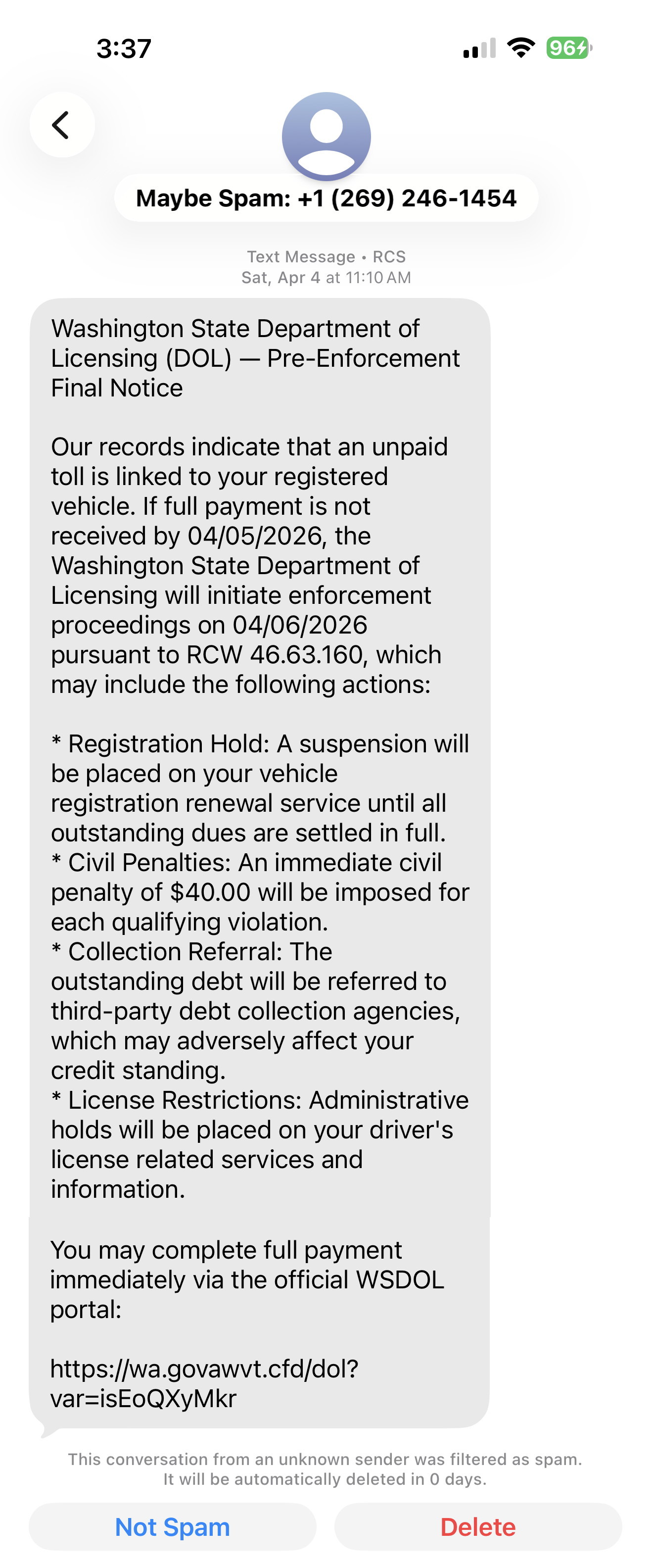 Unexpected Summons by text message.
NOT from WA state!
DO NOT RESPOND.
Internet Crime
Any one bothered by internet criminal activity should report it to the Federal Bureau of Investigation Internet Crime Complaint Center (IC3) at this web page. This includes phishing, malware, spoofing, any demand for money.

Sell or Swap
by MAGIC
Got something you would like to sell or give away? Need something second hand or out of date? Contact MAGIC at this email .
Nothing this month.

About the Notes App *
by Ron Sharp, MAGIC
The MAGIC Zoom presentation for August was on the Notes app. I wanted to show how useful the Notes app is on the iPhone, so I recorded a video while showing the features on the iPhone. Unfortunately the sound didn't come through when I replayed it while sharing my screen on the zoom meeting. While it showed some of the apps features, it may not have been the clearest presentation to follow. So here is what you could call a recap of some of the Notes apps options.
I use the Notes app very frequently on the iPhone and seldom on the Mac. For the obvious reason, I have have my phone with me most of the time. It's super easy make shopping lists, especially using the microphone option to just speak the items I want to add to a shopping list. I also take a photo of an item to look for or remember a specific brand. You can just click the "Paper Clip" button for the option to add an image to a note. You can take a photo or choose the option to add a photo from you Photos app.
The Paper Clip is in the tool bar that shows above the keyboard. There are about 17 tool options, but you need to swipe the tool bar to the side to see all three windows of tools.
You can make folders to sort your notes, and add as many notes as you want to a folder. The first item you type for a note automatically becomes the title of that note. I use the app for things like lists of books and movies, birthdates, travel notes, health notes, restaurants, and most often for shopping lists.
There are fairly recent changes to the app for "Markup" where you can draw on notes, add separate text boxes add signatures. There are also font and formatting options for colored text and Heading, Sub Heading, and body formats to choose.
You store your notes on your iPhone, or if want to be able to access your notes on your other devices, you can sync them with Apples' iCloud. When you create a new note you can choose to save in either place, in iCloud or on the your iPhone only. And you can move your notes from one folder to another. For instance from iCloud to a folder on the phone only.
You can also "Lock" a note. If you have sensitive data, or just prefer the extra security, you can set a password to lock a note. After it is set up, then face recognition is all you need to access the note.
If you haven't used the Notes app, try it and I think you'll see how useful it can be.
Fun or Informative Videos *
by Ron Sharp, MAGIC
How SpaceX Lands a Rocket Without Hovering
Click for video.
A Quick Recap of what's coming to iPhone with iOS 27
Click for website and slide show.
MAGIC, the Macintosh Appreciation Group of Island County, serves people who use Macintosh computers, software and peripherals. Our goal is to share information and get answers to questions to make us more productive with our use of technology. Our monthly meetings give us a chance to discuss computer problems and share ideas with other Mac users, feature speakers on specific topics, and to keep apprised of Apple news.